Guides · July 27, 2026 · 9 min read
How to Make UGC Videos: A Practical Guide for Brands
Learn how to make authentic UGC videos step by step, find the right creators, avoid common mistakes, and boost conversions on a lean budget.
To make a UGC video, start by defining one clear goal and message, write a short natural brief, then film it vertically on a smartphone with good light and clean audio. Either shoot it yourself, ask a real customer, or hire a content creator. Edit in a mobile app like CapCut, add captions and subtitles, and keep it 15–45 seconds for Reels, TikTok, or YouTube Shorts. The point is authenticity, not polish. Well-made User Generated Content builds trust and lifts conversion rate because it looks like a genuine recommendation, not a scripted ad.
What Is a UGC Video and Why It Matters for Brands
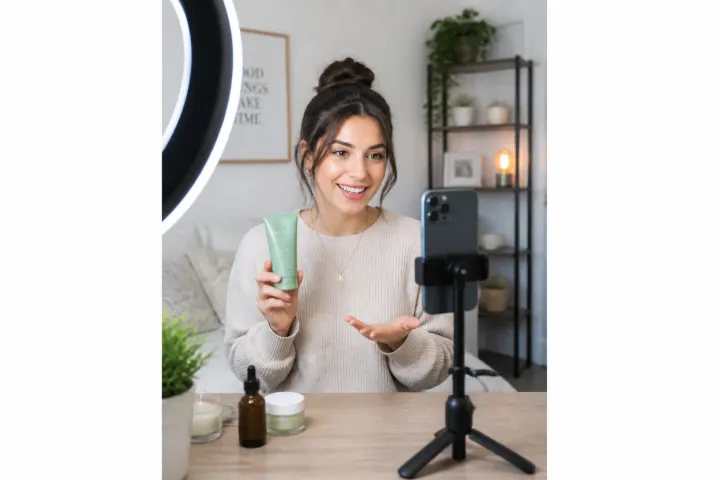
User Generated Content (UGC) is video created by real people — customers or hired creators — that looks and feels like an ordinary person sharing their experience. Instead of a glossy studio commercial, you get a handheld clip filmed in a kitchen, a car, or a bedroom.
How UGC Differs From Traditional Ads and Brand Content
Traditional brand content is top-down and polished: high production budgets, actors, and a scripted sales pitch. UGC flips that. It’s shot casually, spoken in the creator’s own words, and designed to blend into a social feed. On Instagram, TikTok, and YouTube Shorts, viewers scroll past ads but stop for content that feels like a friend’s recommendation.
test 1
test 2
test 3
but 1
but 2
but 3
| Table 2 | Table 3 | Table 1 |
|---|---|---|
| test 1 | test 3 | test 2 |
| تست فونت | تست فونت | تست فونت |
Why Authenticity and Trust Win in UGC
People trust people more than logos. A creator holding your product and describing a real problem it solved carries more weight than a banner. That trust is what moves someone from watching to buying, which is why UGC often outperforms polished ads on engagement rate and conversion rate — even with a fraction of the budget.
Types of UGC Videos
Different goals call for different formats. Pick the type that matches where your audience sits in the buying journey.
Product Experience: Unboxing and Reviews
The creator opens the package, reacts, and shares first impressions. Unboxing works well for physical products because it recreates the anticipation a buyer feels. Reviews go deeper, covering pros, cons, and who the product is for.
Educational and How-To Videos
Short tutorials show the product solving a specific task — how to set it up, three ways to use it, a quick fix. These videos double as content marketing because they answer real questions people already search for.
Testimonials and Customer Satisfaction
A customer speaks candidly about their result. These are gold for B2B and higher-priced products where trust and proof matter most.
Trend and Challenge-Based Videos
Riding a trending sound or format on TikTok or Reels can push reach fast. The catch: the trend has to fit your brand voice, or it feels forced.
Step-by-Step: Making a UGC Video From Scratch
1. Define Your Goal and Core Message
Before anything, answer one question: what do you want the viewer to feel or do? Awareness, trust, or a click? Pick a single message. A video trying to say five things says nothing.
2. Write a Simple, Natural Brief and Script
Keep the script conversational. Write how people actually talk, not marketing copy. Include a hook in the first three seconds, one clear benefit, and a soft call to action.
Here’s a ready-to-use brief template you can send a creator:
UGC Brief Template
Product/brand: [name + one-line description]
Goal: [awareness / trust / conversions]
Platform & format: [Reels / TikTok / Shorts — vertical 9:16]
Length: [15–45 seconds]
Hook idea: [first-line grabber]
Key message: [the one thing to communicate]
Talking points: [3 bullets max]
Tone: [casual, friendly, energetic…]
Call to action: [what the viewer should do]
Must-avoid: [claims or words to skip]
Deliverables: [raw + edited, plus usage rights]
3. Choose a Creator or Let the Customer Film It
You have three paths: film it in-house, invite a happy customer, or hire a dedicated UGC content creator. Customers bring raw authenticity; creators bring reliability and better pacing.
4. Film With a Phone: Light and Sound Tips
A modern smartphone is enough. Face a window or a soft light so the light hits your face, never behind you. For audio, film in a quiet room and keep the phone close, or use a cheap clip-on mic. Bad sound kills a video faster than average visuals.
5. Edit, Add Captions and Subtitles
Edit in CapCut or a similar mobile app. Trim dead air, keep the pace tight, and add on-screen captions — most people watch muted. Add subtitles so the message lands without sound.
How to Find the Right UGC Creator
Platforms and Methods to Find Creators
Search hashtags on Instagram and TikTok, check creator marketplaces, or post a call in relevant communities. Many creators openly label themselves as UGC creators in their bios.
Criteria for Choosing a Creator That Fits Your Brand
Look past follower count — UGC creators don’t need a big audience because you’re buying the content, not their reach. Judge their delivery style, how natural they sound, video quality, and whether their vibe matches your brand.
Agreeing on Terms and Pricing
Be clear upfront about deliverables, revisions, deadlines, and usage rights. Some creators charge per video; others bundle packages. Decide whether you’re paying only for the video or also for posting on their own account (that’s closer to influencer marketing).
Pricing and Collaboration Models
Common models include a flat per-video fee, package deals (three to five videos at a discount), and product-in-exchange arrangements for smaller collaborations. Rates vary widely by creator experience and market; ask for a rate card and compare a few options before committing.
Tools and Apps for Making UGC Videos
Mobile Filming and Editing Apps
CapCut is the go-to for many creators thanks to templates, transitions, and easy captions. Instagram and TikTok’s built-in editors work for quick native uploads.
Subtitle and Caption Tools
Use auto-caption features in CapCut for fast subtitles, then edit for accuracy — auto-transcription still misses words and needs a human check.
AI Tools for Producing or Optimizing UGC
AI tools can help draft scripts, generate caption ideas, suggest hooks, or repurpose one video into multiple cuts. Use them to speed up the boring parts, not to replace the human voice that makes UGC believable.
Localizing UGC for a Persian-Speaking Audience
Don’t just translate — adapt. Use everyday spoken phrasing, culturally familiar references, and right-to-left subtitle formatting that reads cleanly. Trends often arrive later or differently in local feeds, so watch what’s actually performing for your target audience rather than copying a foreign format wholesale.
B2B vs B2C: Different UGC Approaches
B2C UGC leans emotional and fast — reactions, lifestyle, quick wins. B2B UGC leans on credibility: detailed testimonials, use-case walkthroughs, and results, since buying decisions involve more people and higher stakes. Both value authenticity, but the proof looks different.
Legal Notes and Content Usage Agreements
Always get written permission to use a creator’s or customer’s video in ads. Spell out where you’ll run it (organic feed, paid campaigns), for how long, and on which platforms. A simple usage agreement protects both sides and avoids disputes if a video becomes a hit.
Common Mistakes in Making UGC Videos
Being Too Salesy and Unnatural
The fastest way to lose trust is to sound like an ad. If it reads like a script, rewrite it in plain speech.
Ignoring Audio Quality
Viewers forgive shaky footage but not muffled, echoey audio. Fix sound first.
Copying Trends Without Adapting
A trend that doesn’t match your brand voice feels random. Adapt it, or skip it.
Pre-Publish Quality Checklist
Run through this before you post:
-
Hook lands in the first 3 seconds
-
One clear message, one call to action
-
Vertical 9:16 framing
-
Clean, clear audio
-
Captions and subtitles added and accurate
-
Length fits the platform (15–45s)
-
Feels natural, not scripted
-
Usage rights confirmed in writing
Measuring UGC Effectiveness
Tie each video to metrics that match its goal. For awareness, track views, reach, and watch-through rate. For engagement, watch engagement rate — likes, comments, shares, saves. For sales, follow click-through and conversion rate using tracked links or promo codes. Compare UGC against your standard brand content to see the real lift.
Frequently Asked Questions About Making UGC Videos
How much does one UGC video cost?
It ranges from nearly free (film it yourself or with a customer) to a professional creator fee that depends on experience, revisions, and usage rights. Start small, test what converts, then invest more.
Do we need professional equipment for UGC?
No. A recent smartphone, natural light, and a quiet room cover the basics. A clip-on mic and a small tripod are worthwhile upgrades.
What’s the difference between influencer marketing and UGC?
Influencer marketing buys a creator’s audience and reach. UGC buys the content itself, which you can post on your own channels and run in paid campaigns — regardless of the creator’s follower count.
- dfdsfdsdffds
- dsf
- dfsdfsfds
What’s the best length for a UGC video?
Aim for 15–45 seconds on Reels, TikTok, and YouTube Shorts. Long enough to make a point, short enough to hold attention.
Which platforms suit UGC best?
Vertical short-form platforms — Instagram Reels, TikTok, and YouTube Shorts — are the strongest fit, though the same footage can be repurposed for landing pages and product listings.
Listen: the conversation
Two hosts break down what actually matters in this article.


Comments
Be the first to comment.